
Is Framer Good for Beginners? Honest Review 2026 (We Tested It)
📅 Updated June 26, 2026
⏱️ 10 min read
Try Framer →
Free plan available — no credit card required
Building a website in 2026 shouldn’t require a computer science degree — but it also shouldn’t mean settling for a cookie-cutter result that looks like every other small business in your industry. That’s exactly the tension beginners face when shopping for a website builder: drag-and-drop simplicity versus design quality. Squarespace is easy but limiting. Webflow is powerful but punishing for newcomers. So where does Framer land?
I’ve spent the last several weeks putting Framer through its paces specifically from a beginner’s perspective — starting multiple sites from scratch, stress-testing its AI tools, and comparing its template ecosystem against rivals. What I found surprised me. Framer has matured significantly from its origins as a prototyping tool, and it’s now one of the most beginner-accessible ways to publish a genuinely impressive website. But it’s not without real friction points worth knowing before you commit.
This review covers everything you need to decide: what Framer actually does well for newcomers, where it stumbles, how much it costs, and whether it beats the competition for your specific situation. Let’s get into it.
What Is Framer?
Framer is a browser-based website builder and design tool founded in Amsterdam in 2013 by Koen Bok and Jorn van Dijk. It started life as a code-based prototyping tool popular among product designers at companies like Airbnb and Spotify. In 2021, the company pivoted hard toward a no-code website publishing platform — and that bet has paid off handsomely. By 2026, Framer reports over 1 million active sites published on its platform, with a particularly strong following among freelancers, agencies, and startup founders building marketing sites.
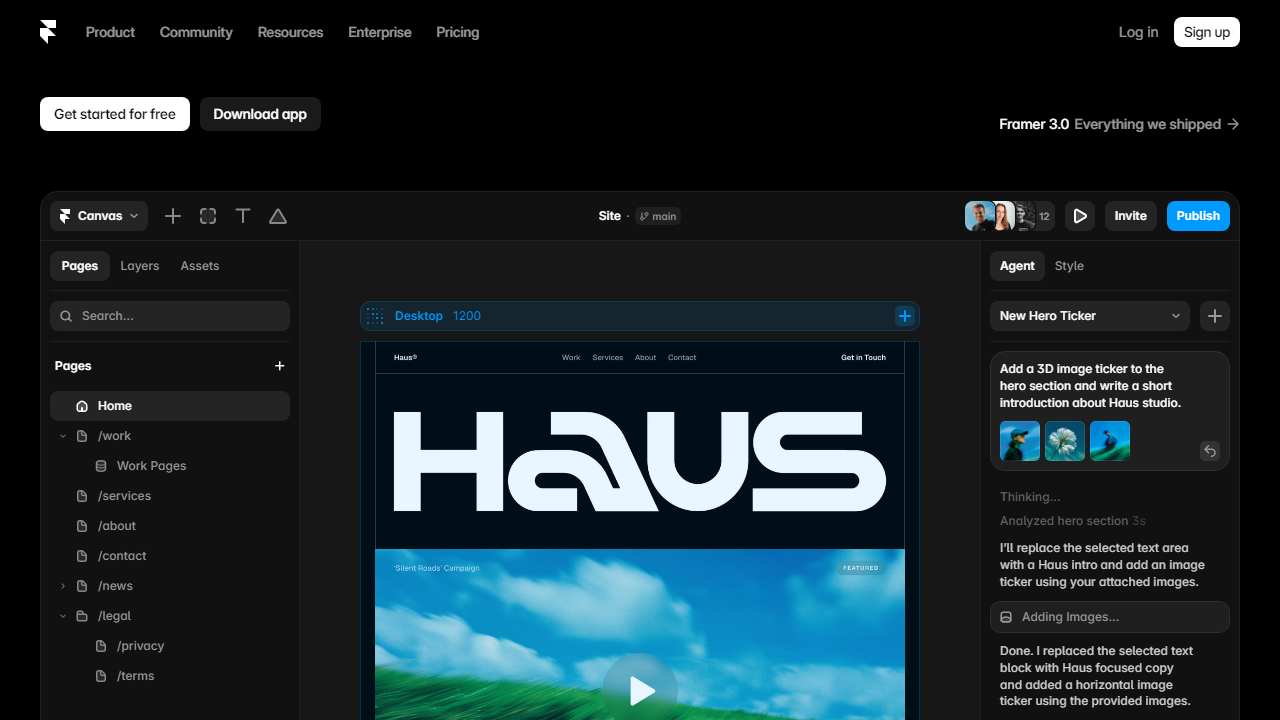
What makes Framer distinct is its canvas-based editor, which operates more like a design tool (think Figma) than a traditional block-based website builder. You position elements freely, control spacing with precision, and apply scroll-triggered animations without touching a line of code. The result is that sites built in Framer tend to look custom-designed rather than templated — a meaningful advantage when first impressions matter. Since 2024, Framer has also integrated a capable AI site generator that can produce a full page layout from a text prompt in under a minute.
Framer is headquartered in San Francisco and Amsterdam, operates on a freemium SaaS model, and competes most directly with Webflow, Squarespace, and Wix — though its design philosophy is closer to the former.
Key Features of Framer for Beginners
Here’s where Framer either wins or loses for newcomers. The feature set is rich, but not all of it is beginner-friendly by default. These are the capabilities that matter most if you’re just starting out.
AI Site Generation
Framer’s AI tool lets you describe your website in plain English — “a portfolio for a landscape photographer with a dark, minimal aesthetic” — and it returns a multi-section layout with placeholder content in roughly 30 to 60 seconds. The output quality is genuinely impressive: layouts are well-structured, typography choices are tasteful, and the sections snap together logically. It’s not always perfect on the first pass, but it gives beginners an excellent starting point rather than a blank canvas panic.
Template Library
Framer offers over 1,000 templates across categories including portfolio, SaaS, agency, blog, startup landing page, and personal branding. Crucially, these aren’t the flat, generic designs you get from Wix — many were created by professional designers and carry real visual weight. Templates are fully editable, and switching sections between different templates mid-project is supported, giving you a modular remix workflow that’s forgiving for beginners who change their minds.
No-Code Animations and Interactions
One of Framer’s biggest selling points is its animation system. Scroll-triggered reveals, hover effects, parallax backgrounds, and entrance animations are all configurable through a visual panel — no JavaScript required. For beginners, this is a major deal because it means you can build sites that feel dynamic and modern without the complexity barrier that stops most people from attempting animations in other tools.
Responsive Design Controls
Framer uses breakpoints (Desktop, Tablet, Mobile) and lets you fine-tune layouts at each size independently. It also has an “Auto Layout” system borrowed directly from Figma that handles a lot of responsive behavior automatically. Beginners will still encounter edge cases where mobile layouts need manual fixes, but the baseline responsiveness out of templates is reliable enough that most simple sites need minimal adjustment.
CMS and Blog Tools
Framer’s built-in CMS allows you to create collections — blog posts, team members, case studies, product listings — and connect them to dynamic page templates. It supports up to 10,000 CMS items on the highest paid plan. For a beginner running a personal blog or a small agency site, this is more than sufficient. The interface is clean and manageable, though power users with complex relational data will hit limitations quickly.
Pricing Plans
Framer’s pricing is structured around site traffic and features rather than the number of sites, which is a generous model for beginners who might want to experiment with multiple projects. All plans are billed monthly or annually (annual saves roughly 20%). Prices below reflect 2026 monthly billing rates.
| Plan | Price/mo | Best For | Key Limit |
|---|---|---|---|
| Free | $0 | Testing & learning | Framer subdomain + branding shown |
| Mini | $5 | Personal sites, low traffic | 1,000 visitors/mo, 1 custom domain |
| Basic | $15 | Freelancers, small business | 10,000 visitors/mo, CMS up to 100 items |
| Pro | $30 | Agencies, content-heavy sites | 200,000 visitors/mo, CMS up to 10,000 items |
For most beginners, the Mini plan at $5/month is the honest sweet spot to start. It removes Framer branding, connects your own domain, and keeps costs negligible while you learn. Upgrade to Basic once your site starts getting real traffic or you need the blog/CMS features to scale. The free plan is genuinely useful for learning the editor before spending a cent.
Who Should Use Framer?
Best Framer Alternatives
Framer is excellent, but it’s not the only answer. Here’s how the major competitors stack up in 2026, depending on your priorities as a beginner.
| Tool | Starting Price | Best For | Our Rating |
|---|---|---|---|
| Squarespace | $16/mo | Beginners wanting maximum simplicity | 4.1/5 |
| Webflow | $14/mo | Advanced users needing CMS power | 4.4/5 |
| Wix | $17/mo | Small businesses, absolute beginners | 3.8/5 |
| Carrd | $9/yr | Ultra-simple one-page sites | 3.9/5 |
The honest comparison: Squarespace wins on simplicity, Webflow wins on raw CMS power, and Framer wins on design output quality per hour invested for a moderately patient beginner. If you’ve never built a website and you’re terrified of anything more complex than clicking a button, start with Squarespace. If you’re willing to spend a weekend learning a tool that will serve you for years and produce genuinely stunning results, Framer is the smarter long-term bet.
Frequently Asked Questions
Final Verdict: Is Framer Good for Beginners in 2026?
After spending significant time in the editor across multiple projects, the answer is a clear and qualified yes — with one important asterisk. Framer is not the easiest website builder that exists. Squarespace is easier. Wix is easier. But “easier” and “better for beginners” are not the same thing. Framer rewards the beginner who’s willing to invest a few hours upfront with results that genuinely look like they were built by a professional designer, not assembled from stock templates. That payoff is real and meaningful.
The AI generation feature has dramatically lowered the


