How to Use Webflow for Beginners: A Complete Step-by-Step Guide (2026)
📅 Updated June 28, 2026
⏱️ 14 min read
Try Webflow →
Free plan available — no credit card required
You’ve probably landed here because someone — a designer friend, a YouTube tutorial, a job posting — told you that Webflow is the tool you need to learn. Then you opened the designer interface for the first time, stared at the panel of boxes, flexbox controls, and class selectors, and immediately closed the tab. We’ve all been there. Webflow’s reputation for being simultaneously the best and most intimidating website builder on the market is completely earned.
After spending several weeks building real projects in Webflow — a freelance portfolio, a marketing landing page, and a small blog with a CMS — we’ve put together the most practical beginner’s guide you’ll find in 2026. We’re not going to sugarcoat the learning curve, but we will show you exactly how to navigate it so you don’t waste hours going in circles. Whether you’re a freelancer, a small business owner, or a marketing professional trying to stop depending on developers, this guide covers everything you need to launch your first Webflow site.
Webflow was founded in 2013 and has grown to over 3.5 million users as of 2026. It occupies a unique space: more powerful than drag-and-drop builders like Wix, less developer-heavy than coding from scratch. This guide walks you through the interface, core concepts, pricing, and when to use it — or when to walk away.
What Is Webflow?
Webflow is a visual web design platform that lets you build fully custom, responsive websites without writing code. Unlike traditional page builders that generate bloated markup, Webflow’s designer translates your visual decisions directly into clean HTML, CSS, and JavaScript. Think of it as a professional front-end development environment where the output is real, production-ready code — you’re just using a visual interface instead of a text editor.
The platform has three core components working together: the Designer (the visual canvas where you build), the CMS (for dynamic content like blog posts, team members, or product listings), and Webflow Hosting (fast, AWS-backed infrastructure with a global CDN). You can use all three together or mix and match. Some teams use Webflow purely for design and export the code to host elsewhere, while others rely on Webflow’s full hosting stack.
In 2026, Webflow has also expanded its ecosystem with Webflow Apps — a marketplace of third-party integrations covering everything from form handling to SEO auditing — and improved its AI-assisted design features that can generate layout scaffolding from a text prompt. These additions make it meaningfully more accessible for beginners than it was even two years ago.
Key Features of Webflow (for Beginners)
Webflow is a deep platform with dozens of features, but as a beginner, you’ll spend most of your time with a core set of tools. Here’s what actually matters when you’re starting out.
The Visual Designer Canvas
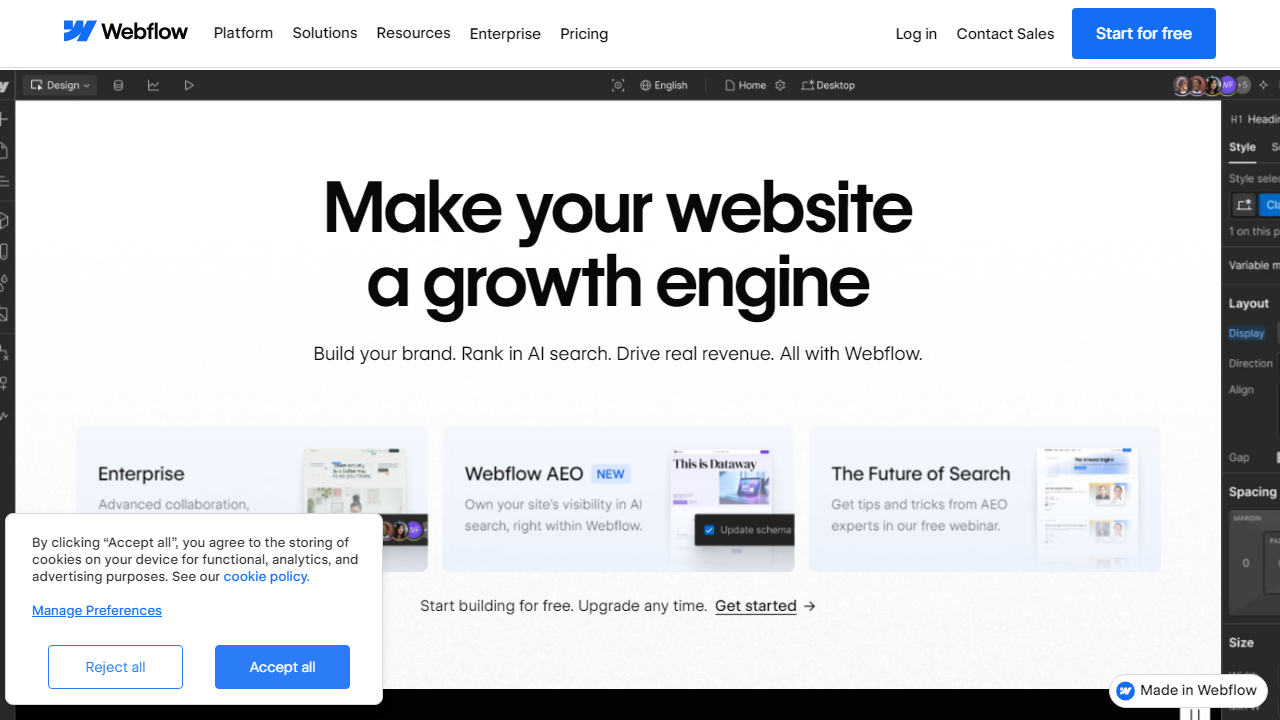
The Designer is Webflow’s centerpiece and the first thing you’ll need to get comfortable with. It uses a box-model layout system — every element on the page is a div, section, or container — which mirrors how real CSS works. The left panel handles your page structure (navigator), the right panel handles styling (the equivalent of writing CSS), and the center is your live canvas. Once you understand that every style is applied via a class — not to individual elements — the whole system clicks into place. Plan on spending your first three hours just learning the panel layout before touching an actual design.
Webflow University
Webflow University is genuinely one of the best free learning resources in the no-code space. As of 2026, it includes over 200 video lessons organized into structured courses covering the designer basics, CMS, interactions, e-commerce, and more. The “Webflow 101” course alone takes about 4 hours to complete and will take you from zero to building a real page. We’d strongly recommend completing at least the first two courses before trying to build your actual project — it saves far more time than it costs.
Pre-Built Templates
Webflow’s template marketplace offers over 2,000 templates in 2026, ranging from free starter layouts to premium templates priced between $49 and $149. For beginners, using a template is the smartest starting point — you can reverse-engineer how an experienced Webflow designer structured a page, modify the styles to fit your brand, and swap in your own content. Free templates are solid; premium ones tend to have more polish and better interaction design built in.
CMS Collections
Webflow’s built-in CMS lets you define structured content types — called Collections — and bind them to dynamic page templates. For example, you create a “Blog Post” Collection with fields for title, body, author, and featured image, then design a single template page that automatically generates a unique URL for every post you publish. It supports up to 10,000 CMS items on the CMS plan. This feature alone replaces the need for WordPress for most small to mid-size content sites.
Interactions and Animations
Webflow’s interactions panel lets you create scroll-triggered animations, hover effects, and multi-step page transitions — no JavaScript coding required. As a beginner, this is an area to explore after you’ve mastered the basics. It’s powerful enough to replicate effects you’d typically see on award-winning agency sites, but the learning curve within this specific feature is steep on its own. Start simple: a fade-in on scroll takes about 5 minutes to set up once you know where to look.
Responsive Design Controls
Webflow handles responsiveness through explicit breakpoints: Desktop (1280px+), Tablet (991px), Mobile Landscape (767px), and Mobile Portrait (478px). You design at each breakpoint independently. Styles cascade downward — changes at desktop apply to all breakpoints unless you override them at smaller sizes. This approach gives you precise control but means you need to consciously check and adjust every layout at each breakpoint before publishing. Always design mobile-last when starting out, and budget time to QA all four breakpoints before going live.
Webflow Pricing Plans (2026)
Webflow’s pricing has two tracks: Site plans (for hosting individual websites) and Workspace plans (for teams and agencies managing multiple projects). For beginners, you’ll primarily be looking at Site plans. All prices below are billed annually — monthly billing runs approximately 20% higher.
| Plan | Price/mo | Best For | Key Limit |
|---|---|---|---|
| Free (Starter) | $0 | Learning & experimenting | 2 pages, webflow.io subdomain only |
| Basic | $14/mo | Simple static sites, portfolios | No CMS, 150 pages max |
| CMS | $23/mo | Blogs, content-heavy sites | 10,000 CMS items, 3 guest editors |
| Business | $39/mo | High-traffic marketing sites | 10 guest editors, 400GB bandwidth |
| E-commerce Standard | $29/mo | Small online stores | 500 products, 2% transaction fee |
For most beginners, the CMS plan at $23/mo hits the sweet spot — it unlocks the full CMS functionality and lets you connect a custom domain, which is the setup you’ll want for any real project. The free plan is genuinely useful for learning, but the 2-page limit means you’ll hit its ceiling fast.
Who Should Use Webflow?
Best Webflow Alternatives in 2026
Webflow isn’t the right tool for every situation. Here’s how it stacks up against the most common alternatives beginners consider:
| Tool | Starting Price | Best For | Our Rating |
|---|---|---|---|
| Squarespace | $16/mo | Beginners who want beautiful results fast | 4.1/5 |
| WordPress.com | $9/mo | Bloggers & content-heavy sites | 3.9/5 |
| Framer | $15/mo | Designers transitioning from Figma | 4.2/5 |
| Wix | $17/mo | Absolute beginners, small businesses | 3.7/5 |
If you want the easiest possible path to a good-looking site, Squarespace wins on simplicity. If you’re a Figma-native designer who wants something with a shallower curve than Webflow, Framer is worth serious consideration in 2026 — it’s closed the gap significantly. But if you want the most powerful, flexible output, Webflow still leads the pack.
Frequently Asked Questions
Frequently Asked Questions
Is Webflow good for absolute beginners?
Yes, though it has a steeper learning curve than Wix or Squarespace. Webflow University offers free video courses that walk complete beginners through every core concept. Most users feel confident building basic sites within one to two weeks of consistent practice.
Do I need to know how to code to use Webflow?
No coding knowledge is required. Webflow’s visual designer handles HTML, CSS, and JavaScript automatically. However, understanding basic web design concepts like the box model and flexbox will help you work faster and troubleshoot layouts more effectively.
How much does Webflow cost in 2026?
Webflow offers a free plan for learning and two staging projects. Paid site plans start at around $14/month (billed annually) for basic hosting. E-commerce and CMS plans range from $23 to $39/month, making it competitively priced for professional websites.
Can I migrate my existing website to Webflow?
Yes. You can import content from WordPress and other platforms using CSV files or third-party migration tools. Design elements must be rebuilt manually, but Webflow’s template library and component system make recreation faster than starting entirely from scratch.
Final Verdict
Webflow sits in a unique position in the 2026 website builder landscape — it delivers genuine professional-grade output without requiring a single line of hand-written code. For freelancers, designers, and small business owners who want full creative control and clean production code, it is arguably the most powerful visual tool available today. The initial learning investment is real, but it pays dividends quickly.
If you are serious about building websites that look custom, load fast, and scale with your needs, Webflow is worth every minute spent learning it. Beginners who commit to Webflow University’s free curriculum and follow a structured approach like this guide will be publishing polished, responsive sites far sooner than they expect.
⭐ Editor’s Pick 2026
Start Building with Webflow Today
Free plan available. No credit card required. Join over 3.5 million designers already using Webflow.
Jamie Morrison
Web design educator and Webflow Expert with 8+ years building client sites. Contributor to multiple no-code publications.


